Showing posts with label Security. Show all posts

Wednesday, January 15, 2025

Lockdown Mode

After reading about it, I gave Lockdown Mode a try:
Lockdown Mode disables or restricts such commonly used tools and activities as photo sharing, payment applications and use of unsecured local networks—all features that attackers often exploit to install spyware through phishing attempts and malicious downloads.

Unsolicited FaceTime calls and messages from unknown contacts are blocked. Standard features of modern messaging, like preview links and automatic media downloads, also are disabled. Links to images or files appear as plain text URLs without previews or direct opening options. Popular features like Apple Pay become limited, too. When someone sends money through Apple Cash, recipients see only a generic notification rather than specific payment details. Payment integrations also become more limited in third-party apps.

Users can still approve access to trusted websites and applications for more flexibility. But in return for beefed up security, Lockdown Mode essentially transforms iPhones, iPads and Macs into stripped-down versions of themselves.
Accessing the feature on the iPhone is easy. Go to Settings>Privacy and Security>Lockdown Mode, then press a series of buttons to restart the phone.

The only drawbacks seem to be that there now are constant reminders to set Lockdown mode on my other Apple devices (iPad, Mac) and that the phone works more slowly.

Trading speed for more security is worthwhile for this non-power user, and I will be using Lockdown Mode when I go out of town.

Friday, July 19, 2024

More Dependence Means More Vulnerability

The blue screen of death (SFGate)
The Microsoft Windows "blue screen of death" appeared on many thousands of computers worldwide and disrupted operations of a broad swath of major industries, including airlines, banks, and hospitals. The culprit wasn't a hacker but a software update issued by the cybersecurity firm CrowdStrike.
The outage, one of the most momentous in recent memory, crippled computers worldwide and drove home the brittleness of the interlaced global software systems that we rely on.

Triggered by an errant software update from the cybersecurity company CrowdStrike , the disruption spread as most people on the U.S. East Coast were asleep and those in Asia were starting their days.

Over the course of less than 80 minutes before CrowdStrike stopped it, the update sailed into Microsoft Windows-based computers worldwide, turning corporate laptops into unusable bricks and paralyzing operations at restaurants, media companies and other businesses. U.S. 911 call centers were disrupted, Amazon.com employees’ corporate email system went on the fritz, and tens of thousands of global flights were delayed or canceled.

“In my 30-year technical career, this is by far the biggest impact I’ve ever seen,” said B.J. Moore, chief information officer for the Renton, Wash.-based healthcare system Providence, whose hospitals struggled to access patient records, perform surgeries and conduct CT scans.

Fixing the problem involved technical steps that confounded many users who aren’t tech-savvy. Some corporate IT departments were still working to unfreeze computer systems late on Friday. CrowdStrike said the outage isn’t a cyberattack.
Unfortunately, restarting computers and removing the offending software had to be done manually---skills well within the capability of Windows users 30 years ago but unfortunately lacking in the majority of users today. (An analogy is being able to understand the basic workings of an automobile and effecting some minor repairs versus being totally helpless if anything should go wrong with one's car.)
IT teams often can fix problems on employees’ computers using remote-access software—tools that became especially common during the work-from-home boom of the pandemic. But for laptops and other PCs that approach doesn’t work if the machines can’t restart. For those systems, CrowdStrike’s fix had to be done in person—either by a tech-support person on site, or by a regular employee trying to apply the instructions.
Another aspect of resilience is being able to perform one's basic job functions if the computers--which after all were once regarded as just a tool--go down.

Speaking as one who used to close the books, make the payroll, invoice the customers, and pay the bills with an adding machine, a pen, and a typewriter, I am appalled by accountants who lack basic knowledge of the functioning of accounting systems.

Maybe this CrowdStrike incident will be a wake-up call to companies who don't want to risk their existence on the computers always working.

Monday, June 10, 2024

Apple: the Primacy of Privacy

AAPL sold off 2% today
After its run-up to the Worldwide Developers Conference, Apple stock sold off 2% today, as traders greeted Apple's introduction of its artificial-intelligence products with a yawn.
Apple said its new software will retrieve information from across apps and scan personal information to help users proofread text, call up photographs of specific family members or gauge traffic patterns ahead of an atypical commute. Users can create images and emojis and even convert rough sketches into polished diagrams...

For certain complex Siri requests, Apple will surface a prompt to ask if the user wants to connect with ChatGPT to get a better answer. Apple is also allowing ChatGPT to connect with other areas of the operating system, such as using the AI to help with composing text. Apple said it gives users the ability to control when and if they want to use ChatGPT...
Apple's AI features didn't overtake the competition technically, but as an Apple customer I really liked the emphasis on privacy. (By way of contrast Microsoft Windows' AI tool "Recall" takes snapshots of users' screens every five seconds and stores the images on an unencrypted database that is easily hacked.) [bold added]
Privacy is at the heart of Apple’s new AI capabilities, a feature that could further lock users into its ecosystem. Most processing will be done on a device instead of shipping to the servers in the cloud. But the company said for running larger AI models Apple will keep it private by running its own servers with what it calls Private Cloud Compute. It will only send data relevant to the task to these servers. The data isn’t stored or accessible by Apple for further training, the company said.

ChatGPT queries from Apple devices will be routed to OpenAI servers, but user information won’t be shared with OpenAI, and the startup won’t be able to identify the queries from specific Apple users. Apple will use a version of ChatGPT that is available free elsewhere online, but those with premium ChatGPT subscriptions will be able to link their accounts.
Users' data is stored on the device itself. If more processing power is needed, then tasks are diverted to Apple's private servers. Users can call on Open AI's ChatGPT, but even here protections are in place.
user information won’t be shared with OpenAI, and the startup won’t be able to identify the queries from specific Apple users.
As an Apple investor and a customer with privacy concerns, I appreciate the fact that Apple will be using its own silicon and not be as beholden as everyone else to external data centers running on Nvidia chips.

This fall I'll be buying a new iPhone 16. My six-year-old iPhone XS Max has served me well, but it's time to move on to the brave new AI world (as well as a much better camera and battery).

I'm not so presumptuous as to believe that hundreds of millions of iPhone, Mac, and iPad customers think like me and will soon upgrade their hardware, but there's a good chance that will be true, so if I didn't already own Apple stock, I'd be buying some.

Friday, May 31, 2024

Just Say No

Two weeks ago I remarked upon the reason I no longer sign up for ID-theft services:
They always involve sharing with yet another company very detailed information, such as date of birth, social security number, bank account and brokerage account numbers, where one has lived for the past forty years, whether one owns or rents, etc. To me the risk of that new company being breached by a hacker or a crooked employee is greater than the benefit of that company's protection.
In other words information can't be stolen if it wasn't out there in the first place.

(WSJ image)
One's Social Security number is among the items that should be most zealously guarded. That, along with one's date of birth, allows access to one's medical and financial records over the phone. (I speak from recent personal experience.) However, many companies who have no legal necessity. such as tax reporting, to have the social security number of customers routinely ask for them. [bold added]
In many cases, there’s a simple solution to this: Just say no. According to privacy and security experts, in many situations we shouldn’t have to turn over our number. And if we refuse to give it, organizations often will back down.

“Skip it if you’re filling out something that isn’t a legal document, related to a loan or opening a financial account,” says Rachel Tobac, chief executive of SocialProof Security, which helps companies protect themselves from malicious hackers. “If somebody then comes up to you and says, ‘Unfortunately, it stinks, but we really need to get your Social Security number to verify you,’ you can simply ask them to access your records with some other form of ID and see what happens. Sometimes, they should be able to.”
I'm so old I remember when one's social security number was routinely printed below one's address on checks. Now writing a check itself isn't safe:
When you write a check, you're providing a wealth of personal information, including your name, address, bank account number, and signature. This sensitive data can be exploited by fraudsters for identity theft or other malicious purposes, putting your financial security at risk. ‍
Life is much better than it used to be, but not in every case.

Friday, May 17, 2024

Satisfaction

Free shredding last Saturday
More than half of the companies (financial, telecommunications, medical) that I deal with have experienced data breaches. To allay customers' worries they always offer a year's free subscription to a security service that will monitor suspicious activity--for example, new credit cards taken out in customers' names--and provide insurance against ID theft losses.

I signed up for one or two of these protective services in the past but have stopped doing so. They always involve sharing with yet another company very detailed information, such as date of birth, social security number, bank account and brokerage account numbers, where one has lived for the past forty years, whether one owns or rents, etc. To me the risk of that new company being breached by a hacker or a crooked employee is greater than the benefit of that company's protection.

So I go back to the traditional method of checking credit card statements and reconciling (what's that kids? look it up) financial accounts monthly--stuff I had been doing for thirty years before the internet existed. Other than a few times my credit card number has been stolen to make some purchases for several hundred dollars, I have never had a problem with ID theft (knock on wood).

As for preventing leaks from paper sources, we bundle the documents that need to be destroyed--old tax returns are too voluminous for our home shredder--and take them to City Hall for Foster City's free-shredding Saturdays.

There was a grinding sound as the papers were lifted into the machine and pulverized. You can't get that satisfaction from cleaning a hard disk.

Friday, March 01, 2024

New Name for an Old Problem

Legacy systems guy (BairesDev photo)
"Technical Debt":
an accumulation of quick fixes and outdated systems never intended for their current use, all of which are badly in need of updating.

Technical debt manifests in myriad ways, from system failures and slower innovation, to security breaches...

This technical debt would require $1.52 trillion to fix, and costs the U.S. $2.41 trillion a year in cybersecurity and operational failures, failed development projects, and maintenance of outdated systems, according to a 2022 report by a software industry-funded nonprofit.
Let's face it: management is highly incentivized to come out with new products and features, not to spend resources on making old software more secure or efficient. If management is lucky, potential weaknesses will never become actual weaknesses and see the light of day.

There's never been a better time to start a business when the old competitors are burdened by legacy software and customers are stuck doing things the old way,

Saturday, September 02, 2023

Not Tending to Basics

Check 5378 for $320 mailed on 8/5, bank account not cleared as of 8/21
The license and registration fees were due by August 22nd so I mailed the check to the DMV's Sacramento post office box two weeks early.

I do pay bills electronically, but for payments that have tax consequences (part of the license renewal is personal-property tax, which may be deductible on Schedule A) I like to write an old-fashioned check. It's nice to have a copy of the cancelled check to show the IRS in the event of an audit.

Aware of the security risk from dropping off a letter at a mailbox, I mailed the DMV payment from the Foster City Post Office on August 5th.

On August 21st I checked the bank account online. The check still had not cleared the bank.

The problem lay with the DMV cash receipts system or the U.S. Postal delivery system, but it wouldn't be wise to invite a late-payment penalty and try to appeal it. So I paid the fee on 8/21 directly using a Discover credit card.

Sure enough, California and the USPS didn't lose the check. It was deposited on August 31st (above) and I have a credit balance that I hope will get back in a month or so.

People disagree about many aspects of government, but the vast majority, I suspect, want government systems to work quickly, effectively, and honestly. An accurate cash receipts system is basic to organizations, and the structural principles were known decades before electronic data processing (EDP) was ubiquitous.

I worry about a California government that's always working on the next big thing and not tending to basics, like handling checks or verifying unemployment claims (EDD fraud is $32 billion). No one pays the penalty for the systems falling apart, and no one gets promoted for tending to them.

Saturday, November 19, 2022

I’d Rather Have My Problems Than Theirs

2021: tents along Kapiolani Boulevard, a block from my parents' home
The homeless tents have moved from across the street to our side, albeit two blocks Ewa (that's west, for you malihinis). Overall homelessness is reported to be improving slightly, but statistics don't matter much to individual neighborhoods.

Second cousin's iron bars are to the right of the wall
My second cousin, who owns the building next door, says trespassing is getting worse. She's installing iron gates that, like ours, will be closed at night.

The strip of grass next to the sidewalk (pictured right) is overgrown. A younger relative is supposed to tend to it, but he works two jobs and deserves a break. My brother lent me a trimmer, and I took care of the grass, although not very neatly.

My brothers have done a good job handling day to day operations, but I needed to get a sense of where Mom's finances stood. Besides, it's almost the end of the year when we must prepare her tax returns. The eight-day vacation has sped by quickly, and it's time to plan for the next one.

Monday, February 28, 2022

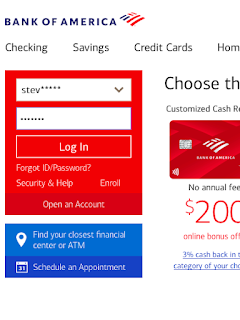
Bank of America: Not Optimal

Asterisks hide passwords from users, too
It's possible to have too much security on an internet bank account.

As many websites do, Bank of America's replaces password characters with asterisks (*) shortly after the characters are typed in. Because passwords now have numbers, special characters, and both lower-case and capital letters, the probability of a mistake has increased as passwords have become lengthier. But one can't see what has been typed.

Unlike all my other financial and shopping accounts, Bank of America does not have a "show" or "eye"(👁) button that allows the user to turn off the asterisks.

After 3 password failures, Bank of America locks the account. And yes, that has happened to me, and I had to call the bank and spend an hour satisfying the person at the other end that I was not a scammer. The bank had me at its mercy, because the fee structure almost forces retail customers to cancel paper statements in favor of electronic access, which makes it impossible to check or reconcile with a locked account.

I've also gotten to the third and final login attempt several times, when my aging arthritic hands shook with trepidation (okay, some poetic license here).

Bank of America does allow FaceID to login on the iPhone, but the user can do it on only one account--I was locked out of one of the other two which required a typed password.

All the above is a protracted preface to a simulation that showed
that five was actually the optimal number—the sweet spot we were hoping to identify. When allowing five attempts, the number of lockouts were minimized, with no adverse effect on security.
Bank of America would make me a happier customer if: 1) the Password field had a "show" option; 2) the account would lock after the fifth attempt, not the third; 3) iPhone FaceID would work on every account, not just one. I would like all of those changes, but I am not expecting any.

Come to think of it, why am I staying with them?