Showing posts with label Macintosh. Show all posts

Wednesday, January 15, 2025

Lockdown Mode

After reading about it, I gave Lockdown Mode a try:
Lockdown Mode disables or restricts such commonly used tools and activities as photo sharing, payment applications and use of unsecured local networks—all features that attackers often exploit to install spyware through phishing attempts and malicious downloads.

Unsolicited FaceTime calls and messages from unknown contacts are blocked. Standard features of modern messaging, like preview links and automatic media downloads, also are disabled. Links to images or files appear as plain text URLs without previews or direct opening options. Popular features like Apple Pay become limited, too. When someone sends money through Apple Cash, recipients see only a generic notification rather than specific payment details. Payment integrations also become more limited in third-party apps.

Users can still approve access to trusted websites and applications for more flexibility. But in return for beefed up security, Lockdown Mode essentially transforms iPhones, iPads and Macs into stripped-down versions of themselves.
Accessing the feature on the iPhone is easy. Go to Settings>Privacy and Security>Lockdown Mode, then press a series of buttons to restart the phone.

The only drawbacks seem to be that there now are constant reminders to set Lockdown mode on my other Apple devices (iPad, Mac) and that the phone works more slowly.

Trading speed for more security is worthwhile for this non-power user, and I will be using Lockdown Mode when I go out of town.

Friday, November 03, 2023

Early Birthday Present

My purchase didn't help AAPL's stock today
It seems to be an ironclad law of the universe (which BTW strengthens the argument that we live in a simulation) that shortly after a person begins to brag he gets his comeuppance.

In my case I've been bragging how my 2014 MacBook Air is still going strong while other more recent computers have had to be junked.

A little over a month ago the Air's hard drive failed. It wasn't a simple battery replacement this time. True, it could have been fixed for about $500 including labor, but the MacBook Air's advancements in its retinal display and M2-processing speed over the past nine years strongly incentivized me to get a new one. Another factor was that Apple's days of supporting Intel-based Macs were numbered, and through sad experience I've found that it's wise to be in control of a conversion rather than have it forced upon me.

As an early birthday present to myself I bought a MacBook Air in September. It's functioning as advertised. I hope it lasts at least nine years.

Tuesday, August 29, 2023

Cheaper for a Reason

School Chromebooks awaiting repair in NYC (WSJ)
In 2020 I bought an Acer Chromebook for web-surfing at public WiFi spots. In 2022 I found that there was a good reason the 2½-year-old $175 Chromebook had been so cheap: updates were free only for five years from the date of manufacture:
Why did I get only 2½ years of software updates? Because when I bought it from Amazon in 2020 it had been sitting in inventory since 2018, according to the sticker on the back.
Now schools are learning my sad lesson on a much larger scale:
Low-price, easy-to-use Chromebooks were once a boon to cost-conscious schools. Educators say the simple laptops are no longer a good deal.

Models have shot up in price in the past four years. Constant repairs add to the cost. Google imposes expiration dates, even if the hardware still works. This year, Google ceases support for 13 models. Next year, 51 models will expire...

Chromebooks have no second life. When they expire, they become e-waste. By contrast, Macs and PCs can run apps even after their native software is no longer supported. They can even be repurposed into Chromebook-like devices.
Apple still provides free updates to my 2014 MacBook Air. Though it cost $1,000 at the time, the MacBook was a much better value.

Wednesday, November 23, 2022

A Happier Trip

MacBook Air battery had to be done immediately
I have always brought work on vacation.

The habit started in college during my freshman year, when I flew home for the first winter break with the suitcase half-filled with books. My school was on the semester system, which pushed final exams to January.

High-school friends whose colleges were on the quarter system had already completed their finals and had a more fun-filled vacation than I did.

Having cracked open the books on only a couple of occasions that first Christmas, I learned something useful: only bring work that I was absolutely sure I would spend time on. Leave behind anything that could possibly wait.

Speaking of things that couldn't wait, the replacement laptop battery failed disappointingly after one year (the expectation was three). I gave a moment's thought about trying to wangle a free or discounted replacement from the manufacturer, then opted for the speed and simplicity of ordering another one for $45. It arrived the day before departure, when there were a dozen more important things left to do.

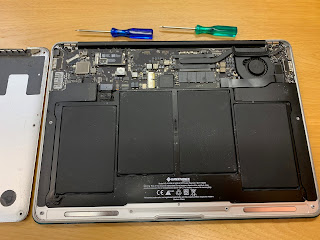
And so it was that I spent my first night in Hawaii taking apart the 2014 MacBook Air, putting in the new battery, and screwing it back to together. The battery could run the computer for four hours, and we're good for another year.

Another lesson: getting it done sooner makes for a happier trip

Thursday, November 04, 2021

Longer Lasting

The new Mac is tempting.
An overarching environmental ethic should be not to throw away anything that can be employed usefully. Not only does following this principle preserve the landfill, it delays or even eliminates the pollution behind making a new item.

And so it was that I opted to replace the battery of the 7-year-old MacBook Air instead of buying one of the fancy new MacBooks.
These laptops balance high performance, portability and power savings in ways we just haven’t known in previous Macs and Windows machines.
The downside of the new Macs: they start at $1,999, but the one I wanted had added memory and an upgraded processor and would set me back $3,000.

The new battery arrived in two days. It was a $50 item which was shipped to Amazon's warehouse long before "supply chain problem" became a term in the popular consciousness.

I opened up the back using torque screwdrivers that came with the battery and put in the new unit.

Obeying the startup instructions to operate the computer until the battery drained completely, then charging it to 100%, I hope to get another three years out of the replacement.

A new Mac would have given me a thrill, but not having to spend $3,000 imparts a longer-lasting satisfaction.

Monday, October 18, 2021

Annoyances Ahead

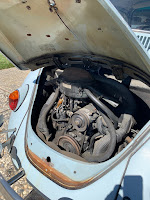
A 43-year-old house, 54-year-old car, and 7-year-old laptop computer have something in common: they all have parts that are breaking down.

Last week the faucet was dripping (I couldn't let it go with water rationing on the horizon), the VW Bug wouldn't run because of a fuel-line and electrical issue, and the MacBook battery was totally kaput (it would shut down immediately if the power cord were disconnected).

Fixing these annoyances doesn't require a SpaceX scientist, but it doesn't help matters that the repair guy himself has parts that are giving him problems.

It should be a challenging week.

Wednesday, November 11, 2020

MacBook Air Life Extension

Last month the touchpad on the 6 year-old MacBook Air became catatonic. The cursor would alternately freeze or skitter across the screen in random directions. Worse, it would open multiple applications and documents, and I had to press the power button to shut down the computer manually.

As the smart people recommend, I zapped the PRAM and reset the SMC but the dysfunction recurred after a few minutes.

Was it time to buy one of the new Macs that were announced today?

Maybe, but just one more thing.....to try.

I wiped out the disk--something that I used to do every six months on Windows machines--then reinstalled everything (of course, this was after performing a back-up to a hard disk). Restoring the Mac to factory settings has the benefit of eliminating all the stray fragments of deleted files that build up over time.

The half a day that it took to clean and reinstall the programs and data was worth the effort.

The touchpad functions like new, and an additional 10GB space was freed up on the solid state drive as a bonus.

The just-announced Macs have switched from Intel-based microprocessors (the speed of the MacBook Air's i7 is perfectly adequate for your humble blogger) to Apple's self-designed M1 microschip (3.5x faster!).

Buying a new MacBook Air was tempting, but thanks to this life-extension project, I'll wait for the M2.

Saturday, July 18, 2020

Apple Store: All Business and a Lot Less Fun

Apple people standing around, but Apple can afford it.
We made an appointment at the Apple Store to fix a 2-year-old Mac.

A security guard took our temperature and told us to wait outside. A masked Apple employee entered a brief description of our problem into his iPad. When the technician was ready, we were allowed to go inside, 15 minutes after our scheduled meeting. The broken screen will be fixed for $99. The cost would have been over $400 if we had not bought AppleCare.

Customers were escorted in and out efficiently. They picked up their merchandise, got their technical problem handled, and shopped under the watchful eye of an Apple salesperson. There were fewer tables displaying Apple products for "just looking" customers to touch.

It was all business, and a lot less fun than it used to be.

Note: San Mateo is one of the few counties that hasn't been shut down--though it could happen at any time--so there's really no complaining here.

Friday, March 27, 2020

Resentment Resurfaces

Now that I'm semi-retired I haven't needed to upgrade Microsoft's Office suite (Excel, Word, Powerpoint) for 12 years.

The 2008 features were sufficient for any tasks that I might undertake; besides, the data flow, logic, and organization of a project are far more important to its success than technical bells and whistles.

Earlier this month I upgraded MacOS, and old Excel wouldn't run some self-developed tax spreadsheets. Now was the time to unwrap the box of Office 365 that I got for Christmas several years ago and thought I never needed. (There are alternatives to Microsoft, by the way; Google and Apple both have competing free products that can work with Office documents.)

Memories of the Microsoft/Intel software/hardware treadmill resurfaced (the new version of the software won't work on the old chip and vice versa). In a year's time Microsoft will bill me $69.99 to renew Office, and I'll pay them because it's not worth the hassle to switch.

They know my weaknesses so well, and I resent them for it.

Thursday, January 23, 2020

2014 MacBook Air: Still Going Strong

Time to install the 3rd case.
The screen on the MacBook Air cracked two years ago, and I had the battery replaced at the same time as the repair. The laptop is still going strong after six years with its 1.7 GHz Intel Core i7 processor and 8 GB RAM. (I looked at the new MacBooks last fall, but the features weren't compelling enough to spend at least $1,000.)

One worthwhile safety measure is to buy an inexpensive (<$15) case every two years. It not only affords protection from the occasional drop but shields the laptop from dirt, food, and spilled drinks.

I'll keep using it until it stops. Meanwhile, I back it up every evening.

Friday, July 15, 2016

AppleCare: Not a Loser

Transferring backup files to the replacement iPhone.
The do-it-yourself fix to the iPhone 6 freezing problem proved temporary, and having to restart the iPhone in the midst of every text message was the breaking point (phone calls weren't prematurely terminated, though). I made an appointment at the local Apple Store.

Apple's tech Genius said that the freezing of the touchscreen was a known hardware problem on the iPhone 6; luckily the iPhone was only in month 20 of its 24-month AppleCare contract.

Your humble blogger has the Apple triad--MacBook, iPad, and iPhone--and a hardware problem on at least one of them crops up every year or two.

I always buy AppleCare on all three, which is still cheaper than replacing one device when it breaks down.

Gamble if the odds are at least close to even, but not buying AppleCare is almost a sure loser.

Thursday, July 30, 2015

Plan B Becomes Plan A

Replacing the battery didn't work, so the problem had to be a broken connection. I pried open the 2008 MacBook to see if there was a possibility for an amateur to perform a zero-cost fix; there wasn't.

The ancient white MacBook, one of the first with an Intel processor, still had its uses. It runs ran equally ancient personal-finance software, and it was never connected to the Internet for security reasons.

I pulled out the hard disk (bottom right in the illustration and, yes, we had it backed up) and put the screws and cover back. The MacBook will go to the recycling center, and we'll destroy the hard disk.

As for our personal-finance software, it still operates on the 2004 pre-Intel iMac G5. Plan B, as often happens, becomes Plan A.

Thursday, May 08, 2014

Adjusted Upward

The hard drive had stopped working, so I hurried to the Palo Alto Fry's to pick up a replacement. [The 2009 MacBook Pro was on the cusp of obsolescence, but a $70 one terabyte (1 TB) Seagate hybrid drive--if it worked--would keep the computer going for at least another year.]

I parked myself in a corner of the nearby Starbucks to change the drive. Starbucks has electric outlets galore, where I could plug the adapters for both the MacBook and the external drive that booted Mac OS while the hard drive was out of commission. Kudos to Starbucks also for leaving me alone; no one asked what I was doing with a mess of cables, screwdrivers, boxes, and parts strewn across a table meant for lattes and frappucinos.

Unfortunately, the new hard drive wasn't recognized by the computer. Next I'll try replacing the SATA cable (bottom left in the photo), which various tech sites suggest could be the problem. Also unfortunately, Fry's didn't have the cable, which had to be ordered from Amazon. Resolution (repair or replace the laptop) would have to wait a couple of days.

[Update - 5/10: the new cable worked. The total cost of the fix was $120, much less than a new computer. The latte and frappucino budget has been adjusted upward accordingly.]

Saturday, September 14, 2013

Battle of the Ecosystems

This humble blog has used Blogger, Google's free blogging and hosting service, for the past ten years. We are also regular users of other free Google applications, gmail, Maps, Calendar, and the Chrome browser, to name but a few. However, we're not monogamous: our hardware is mostly Apple, plus a few legacy PC's for business, and we admit that we're dependent on Apple's App store, iOS, iCal, iCloud, iTunes, and other "i"-services to make it through the day.

We haven't been posting to this blog all week because there's been a glitch in Blogger that won't let us log in. Obviously, a workaround surfaced. Other users pointed to the solution: stop using Chrome, the default browser on our Macs and PCs, and switch to Firefox or Apple's Safari.

Becoming too dependent on one company's ecosystem is a recipe for disaster. (Going all-Apple is not the answer either: if you switched from Google to Apple Maps last year, you could have died.)

The ecosystems do talk to one another. For example, entries on the Google Calendar automatically show up on iCal, so all our devices are linked and sync'ed to a certain extent. It's becoming less necessary to choose sides, and for safety's sake we're not going to. In diversity there is strength. © 2013 Stephen Yuen

Sunday, May 05, 2013

Technology Not Settled

Devices that I use now:
  • iPhone 5 (2012)
  • iPad 2 (2011)
  • MacBook Pro (2009)
  • Gateway SX - Windows 7 (2008)
  • Dell Vostro - Windows XP (2007)

    My mobile devices are fairly up to date, but the desktop and laptop machines are getting long in the tooth. WSJ tech reviewer Walt Mossberg surveyed the computer landscape and advises:
    Alas, I'm sorry to report, it's still pretty confusing and frustrating to buy a new laptop....

    For a high-quality, traditional laptop without a touch screen, you can't do much better than a MacBook Air, if you have at least $999 to spend. On the Windows side, stick with touch screens and be prepared to spend nearly as much, or even a bit more. But if you can wait, come back in the fall.
    Good advice. I've found that with computer purchases it's always better to wait as long as one can before upgrading. Also, the technology should be well enough settled so that the purchase will not be regretted two years later. I'll hold off opening my wallet. © 2013 Stephen Yuen
  • Saturday, October 27, 2012

    Bad MacBook Drive: Not So Bad

    Original 250GB hard drive (bottom left) gave out.
    The 2009 MacBook Pro was taking progressively longer to boot up. The screen froze at least once a day, and the Mac had to be turned off by pressing the power button. Disk Utility said that the file structure was corrupted, and the suggested course of action was to erase the hard disk and reinstall everything.

    The original OSX (Macintosh operating system) CDs were duly inserted into the optical drive, but the reinstallation came to a halt after a few screens. The hard disk had gone bad.

    The hard disk had gone bad are words that fill most computer users with dread, but not those who own Macs and who use the built-in Time Machine program.

    Replacing the 250GB hard disk was a simple matter of running down to Fry's and picking up a 500GB replacement drive for about $70. I asked for a solid-state drive but Fry's didn't have any in stock. Sometimes the universe restrains our impulsivity for our own good. The SSD would have cost close to $200, and I really should save the shekels for the new-computer fund.

    The physical replacement of the hard drive took only 15 minutes, but the reinstallation and updating of the software, even with Time Machine, took most of the evening. But in the end the whole episode was worth it; the MacBook is operating better than it has in years.

    Thoughts:

    1) Old (but not old-old) equipment can be easy and cheap to fix, greatly aided by free guides and instructional videos on the Internet.

    2) The newest equipment--go ahead and blame Steve Jobs--because of its complexity and compactness is impossible to fix by the do-it-yourselfer. Another reason to go after medium-old stuff, if you can live with not having the most advanced and coolest items to show off in public.

    3) It helps to cultivate an attitude of gratitude and a good memory. A 2009 MacBook is an amazing piece of technology compared to the bricks that I used to haul around on business trips ten years earlier.  I'm using only a small portion of its capability and would use even less of the 2012 model with retinal display.  Buy what you need and not what you want, and your chances of obtaining financial freedom are much brighter.
    © 2012 Stephen Yuen

    Wednesday, October 24, 2012

    Forecasting is Uncertain, Especially About the Future

    The Election
    Monday night's debate was the least disputatious of the three debates between President Obama and Governor Romney. The consensus seems to be that the President won the debate but not enough to change the minds of Romney supporters.

    For what it's worth, your humble observer thinks that Mr. Obama may still eke out a win, but the likelihood is that Mitt Romney will be the next President, and a good chance that he will win by a significant margin. There is no possibility that President Obama will get even 300 electoral votes (he won 365 in 2008, and 270 are needed to win).

    iPad Mini
    Tuesday's announcement of the iPad Mini initially triggered disappointment because of its high price relative to the competition:
    The iPad Mini tablet, which starts at $329, is a cousin to the original iPad, whose screen is about a third larger. But Apple's smaller tablet is priced well above Amazon.com Inc.'s Kindle Fire HD and Google Inc.'s Nexus 7—two tablets which are similar in size and some specs. Those devices cost $199 or $249 depending on the amount of memory.
    Apple also announced upgrades to existing products that were understandably overlooked in the hoopla over the Mini. Macintoshes (Mac-minis, iMacs, and MacBooks) and the regular iPad all have become faster under the hood without a price increase. Our household already has ordered a couple of the new Mac offerings.

    As for the iPad Mini, critics would do well to remember how the iPhone 4S took off after an underwhelming reception. It could become the hot new gaming platform or be just the right size for the distaff set--the iPhone screen is too small for many applications, yet the regular iPad is too big to fit in a handbag. Besides, Apple still has room to drop the price later to push sales.

    World Series
    Please, not another post about the Giants, you say, but after tonight's game how can we not comment? The Giants were heavy underdogs in Game 1 to Detroit and its otherworldly pitcher Justin Verlander.

    Three home runs in one World Series game by third baseman Pablo Sandoval---a feat matched by only three other players (Babe Ruth, Reggie Jackson, and Albert Pujols) in history---and a superb performance by supposedly washed-up pitcher Barry Zito added compelling drama to a game that an 8-3 final score would normally belie. Some over-the-top sports reporters are completely reversing their original predictions and calling the Series "over" because the Giants beat the Tigers' ace in one game.

    Whoa, the ball takes funny bounces, political sentiments can shift overnight, and tech dross can turn into gold and vice versa. Forecasting is uncertain, especially about the future. © 2012 Stephen Yuen

    Thursday, August 16, 2012

    Disappointment At the Genius Bar

    Within a few minutes the Apple Genius diagnosed why the MacBook had been freezing on startup: a graphics card gone bad.

    The NVIDIA graphics processors on early-2008 MacBook Pro's were known to fail as early as 2008, and Apple and NVIDIA agreed to effect a free repair within four years from the date of purchase and only if the card failed.

    Of course, the law of warranties applied in this situation (the product breaks after the warranty expires), so I would have to pay $320 to fix the laptop. I said that I would think about it, especially after looking at all the shiny new laptops in the Apple Store. (Replacing the soldered card is beyond my capabilities, so a do-it-yourself repair is out.)

    I have PC's, an iPad, and an iPhone, and my business needs for a MacBook aren't urgent. Nevertheless, it's disappointing that there's not an economical solution to this problem.

    [Update: I took the laptop to We Fix Macs, a long-time Apple repair shop next to the Fry's in Palo Alto. They quoted $450. We're going in the wrong direction.]

    Sunday, August 12, 2012

    In Diversity There is Strength

    2008 frozen MacBook
    Not worth fixing?
    Your humble servant settled the Windows vs. Mac controversy years ago. The solution: get both, unless you're a starving student. For personal uses, such as entertainment or editing videos, the Mac is much easier to work with. Also, transferring data such as calendars and contacts between Macs, iPads and iPhones is quickly effected.

    For business use, I still am wedded to the Windows version of Microsoft Office, as are most of my clients. Yes, Office files can be moved between platforms, but I'm about 20 percent faster on the PC version and do work on the PC more than on the Mac.

    It's always handy to have an extra computer in case one of them breaks down. Over the weekend the four-year-old MacBook froze when starting up and still won't get unstuck. (This post has been written on a five-year-old Dell desktop.) It's an inconvenience that the MacBook is down, but the Dell keeps me in business so there's no need to rush the fix / replace decision.

    In diversity there is strength.

    Related: AT&T persists in hawking its U-verse package. AT&T already has our landline, mobile, and DSL internet account. Now it wants our television, too.

    However, switching from our satellite TV account to AT&T would be risky. AT&T's Internet was down for 12 hours from Friday night to Saturday morning; if we had switched to U-verse our TV could have been down, too. The vulnerability to a single provider is not worth the few dollars saved. © 2012 Stephen Yuen

    Monday, July 09, 2012

    MacBook Power Cord

    Free replacement cords from the Apple Store.
    The MacBook power cord is, like other Steve Jobs inventions, cooler, more complicated, and more expensive than its PC counterparts. The cord connects to the computer magnetically so that an errant footstep would avoid the tripping and tearing problems found with PC power cords.

    The downside is that the MacBook power cord is delicate. It has a mini-circuit board and LED that are susceptible to damage from constant stuffing into computer bags.

    In our household we have three MacBooks and four power cords, two of them broken. I didn't want to spend $80 buying another one, and a fix would require tools and knowledge beyond the capabilities of your humble servant

    But the Internet is a wonderful disseminator of knowledge. In a settlement of a class action lawsuit late last year Apple agreed to replace non-working power cords. I promptly made an appointment at the local Apple store.

    The service rep asked for the serial number of my MacBook (just showing him the laptop was good enough) in order--I'm guessing--to make sure I wasn't a junk dealer trying to get free replacements for damaged parts. The process took about ten minutes, and I left with two new power cords.

    This is the only material benefit I've ever received from a class action lawsuit, so, if only for a little while, I was grateful to the plaintiffs' bar. I was also, of course, happy with how the problem was resolved.

    I promised to return when the next new, amazing, exciting shiny object is announced. One thing is certain: it'll cost more than $80.