Showing posts with label Excel. Show all posts

Tuesday, December 12, 2023

Competitive Excel

The competitors take the stage in Las Vegas (WSJ)
Back in my day I was pretty good at building Excel spreadsheets. But I would never have come close to qualifying for the World Excel Championships, held December 7-9 in Las Vegas:
the omnipresent office spreadsheet software has spawned ranks of data geeks who see Excel as a sport. And here they were at the biggest table of them all: the Microsoft Excel World Championship, held at the HyperX Arena Las Vegas in the Luxor Hotel & Casino. (One floor down from a show by the comedian Carrot Top.)

...the thrills were off the charts at the main tournament, where rivals battled for the Excel championship over three 30-minute sessions that included both high drama and hexadecimals. Watching the action unfold on a giant screen, the live audience screamed cheers of encouragement and surprise and marveled at the rich data types, tables, monster functions, and the dreaded #ref error flashing before them.
Those who, er, excel at competitive Excel are able to identify classes of problems quickly (financial, statistical, dataset searching, etc.), select the functions (built-in algorithms like IRR and COVAR) that might be useful, and put together lines of calculation that produce the answers.

The above approach to spreadsheet building is frankly, anathema to accountants and many financial analysts. In real-world finance we have to build auditable spreadsheets that are reviewable by others. This means organizing linked spreadsheets so that one has the data inputs, others the calculations, and still others the reports. It also helps to write "notes" about what is going on in particular cells.

In Excel tournaments, where the object is to solve the problem in 30 minutes and there is no need, say, to have a work colleague run the calculations in the modeler's absence, many of these design techniques can be ignored.

That said, there is always a need for genius programmers that can get Excel to solve problems that seemed beyond the software's capabiities. At these tournaments it's nice they're finally getting some recognition.

Friday, March 27, 2020

Resentment Resurfaces

Now that I'm semi-retired I haven't needed to upgrade Microsoft's Office suite (Excel, Word, Powerpoint) for 12 years.

The 2008 features were sufficient for any tasks that I might undertake; besides, the data flow, logic, and organization of a project are far more important to its success than technical bells and whistles.

Earlier this month I upgraded MacOS, and old Excel wouldn't run some self-developed tax spreadsheets. Now was the time to unwrap the box of Office 365 that I got for Christmas several years ago and thought I never needed. (There are alternatives to Microsoft, by the way; Google and Apple both have competing free products that can work with Office documents.)

Memories of the Microsoft/Intel software/hardware treadmill resurfaced (the new version of the software won't work on the old chip and vice versa). In a year's time Microsoft will bill me $69.99 to renew Office, and I'll pay them because it's not worth the hassle to switch.

They know my weaknesses so well, and I resent them for it.

Tuesday, October 27, 2015

Lament of a Spreadsheet Reviewer

A knowledgeable consumer needs only to read a couple of paragraphs, listen to several bars, or watch a few minutes of film to tell if a writer, musician, or director is capable.

Snapshot of a few columns in an aviation leasing model: inputs
are blue, on one page, and selected from drop-down menus
Similarly, experienced Excel reviewers can tell at a glance whether the preparer is competent. It's not a matter of how many functions she knows or how many nested loops he can cram into a formula or even whether errors occur (they always do): it's the design that counts, especially in complex workbooks. Input, calculation, and report sheets should all be separated, not only for the reviewer but also for the preparer's own sake during the debug and testing phases.

The graphic (from Journal of Accountancy) says it all
Accountants are some of the heaviest spreadsheet users, and they have some of the most frustrated managers. Staff often rush to meet deadlines by typing over formulas with numeric values--so results don't change when inputs change--and logical errors (e.g., dividing by zero) frequently surface during reviewers' testing.

Just as an editor yearns to rewrite a disorganized essay rather than fix it, so must Excel reviewers fight the temptation to throw out messy calculations and start over.

They function not only as reviewers but teachers.

An article in the Journal of Accountancy, How to debug Excel spreadsheets, promises more than it could possibly deliver in a seven-page article. Some of the tips (Formula Auditing, Edit-Go To-Special) are indeed useful. After the review is done, time would be well spent to
a) teach staff how to do it right the first time
b) instill the discipline of checking one's own work
c) design the calculation flow so that errors are easy to spot.

Tuesday, October 06, 2015

Microsoft Office: the Handwriting is on the Wall

Periodically Microsoft comes out with a revision to its Office software suite, but recently there's no compelling reason for most users to upgrade [bold added]
you don’t need to keep buying new versions of Office. Microsoft hasn’t added a ton of new innovations to typesetting and presentation building—those all work just fine on what you’ve already got.
Since the dawn of the PC era, white-collar workers--by the way, who actually wears white collared shirts any more?--have had to adapt to major software changes required for their jobs. Your humble observer, for example, became quite proficient with the early-1980's word-processing program, MultiMate, then had to relearn the shortcuts when his next employer used WordPerfect, and finally converted to Word when that program became dominant in the 1990's.

Spreadsheets followed a similar path. VisiCalc, the killer app that spurred the sale of Apple II computers, was a marvel in its time. Lotus 1-2-3 became a necessity when the IBM-PC was ubiquitous in the corporate world. Through fair means--and perhaps some foul--Microsoft won the spreadsheet war with Excel, also part of Microsoft Office.

The age of mobile devices has given an opening to competitors like Apple and Google, but their offerings have fallen short---so far. Microsoft has defended its turf because some of Excel's functionality still cannot be duplicated and has been embedded in critical corporate systems.

Nevertheless, the handwriting is on the wall, if for no other reason that startups don't want to create systems with old technology. As its clients wither away so, inevitably, will Microsoft Office.

Thursday, September 19, 2013

Artistic Fonts and Pretty Colors

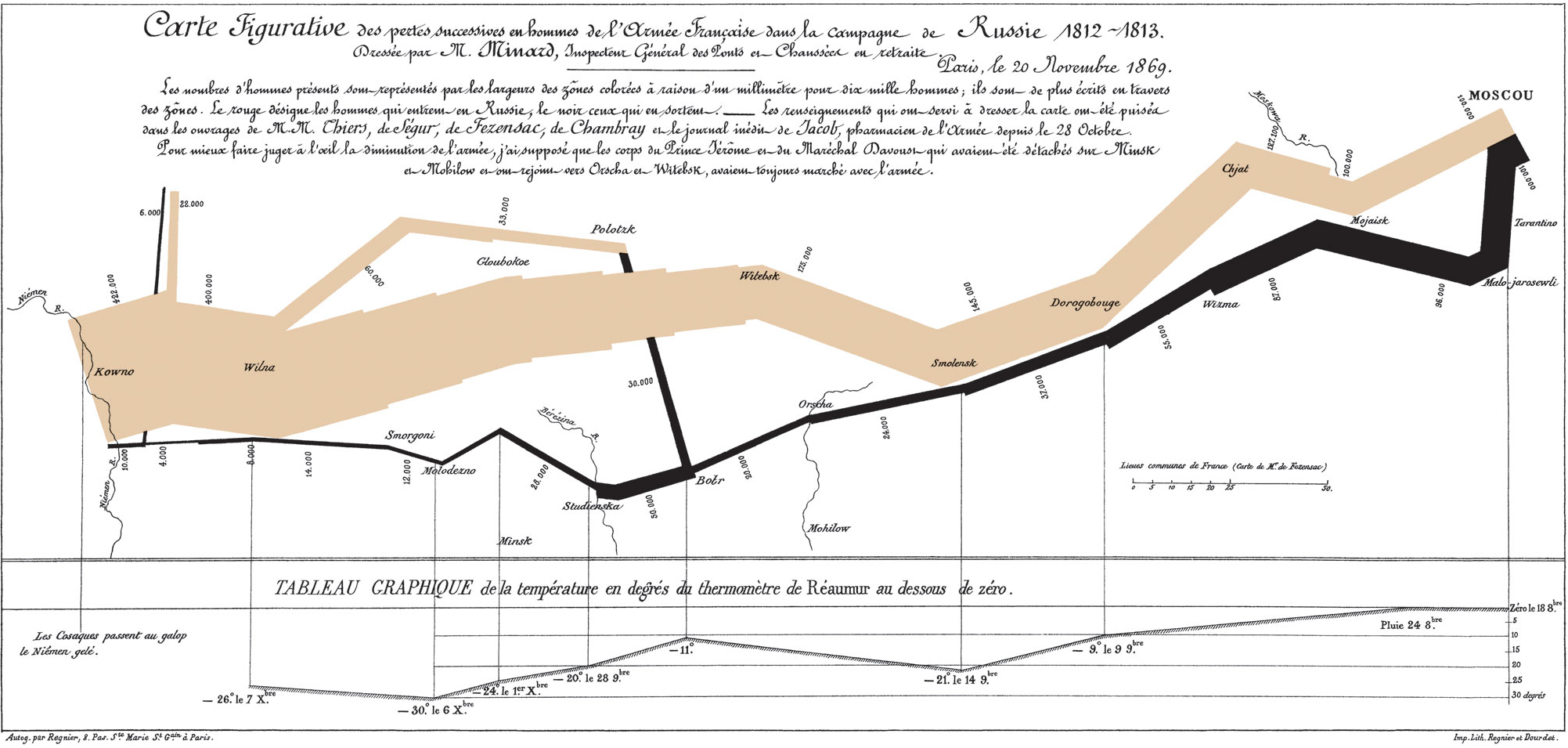
Minard's graph: West to East and back again-
Napoleon's Grand Army shrunk to almost nothing
Human beings have great difficulty understanding mass amounts of data:
Humans are fundamentally different from computers—we're wired to comprehend shapes, patterns and colors. So technology companies are using data visualization to help companies turn large sets of data into pictures that lead people intuitively to the information that is most important to them.
A friend of mine teaches a course on Edward Tufte's Visual Display of Quantitative Information. He leads with Charles Minard's brilliant 1869 rendering of Napoleon's disastrous foray into Russia. The classic graph is renowned for its ability to communicate changes in disparate variables (time, population, location, temperature) in a quickly understood visual form.

Contrast Minard's presentation with the product of newbie analysts, who graph every data set without much consideration for the ultimate point that they are trying to get across. Just as typing one's stream-of-consciousness does not a meaningful essay (or blog post!) make, artistic fonts and pretty colors are no substitute for thought. © 2013 Stephen Yuen

Sunday, August 12, 2012

In Diversity There is Strength

2008 frozen MacBook
Not worth fixing?
Your humble servant settled the Windows vs. Mac controversy years ago. The solution: get both, unless you're a starving student. For personal uses, such as entertainment or editing videos, the Mac is much easier to work with. Also, transferring data such as calendars and contacts between Macs, iPads and iPhones is quickly effected.

For business use, I still am wedded to the Windows version of Microsoft Office, as are most of my clients. Yes, Office files can be moved between platforms, but I'm about 20 percent faster on the PC version and do work on the PC more than on the Mac.

It's always handy to have an extra computer in case one of them breaks down. Over the weekend the four-year-old MacBook froze when starting up and still won't get unstuck. (This post has been written on a five-year-old Dell desktop.) It's an inconvenience that the MacBook is down, but the Dell keeps me in business so there's no need to rush the fix / replace decision.

In diversity there is strength.

Related: AT&T persists in hawking its U-verse package. AT&T already has our landline, mobile, and DSL internet account. Now it wants our television, too.

However, switching from our satellite TV account to AT&T would be risky. AT&T's Internet was down for 12 hours from Friday night to Saturday morning; if we had switched to U-verse our TV could have been down, too. The vulnerability to a single provider is not worth the few dollars saved. © 2012 Stephen Yuen

Thursday, January 12, 2012

Microsoft Office: Hard to Carry, Hard to Displace

At work I'm a heavy user of Microsoft's Office suite, particularly Excel. I will use word-processing and presentation programs other than Word and PowerPoint, but some of my Excel workbooks have man-months invested in their design, programming, and data tables. Spreadsheet competitors claim 100% compatibility with Excel, but I have not risked a switch. I would be betting my livelihood on their claims that functions and macros work perfectly on their product.

The iPad is a convenient reading, viewing, and game-playing device. Microsoft Office on the iPad would be welcome because I much prefer carrying the lightweight iPad to heavier laptops.

OnLive has released a cloud-based "full featured" version of Office that will work on the iPad. Per the WSJ's Walt Mossberg:
I found OnLive Desktop to be a notable technical achievement, but it has so many caveats that it's best for folks who absolutely, positively need to use the full, genuine versions of the three big Office productivity programs on their iPads.
Some of the drawbacks are: the user must be connected to the Cloud, the iPad's virtual keypad won't work (nor will an attached mouse), and documents must be transferred directly to or from OnLive, not through other avenues like e-mail.

So we're not there yet. Until Microsoft releases Office for the iPad, I'll continue to schlep around a laptop.